Agent frameworks · Analysis
Agent Zero AI SKILL.md features: a practical guide
Explore Agent Zero AI SKILL.md features, learn how discovery and pinning work, and build a focused, portable skill with safer defaults.
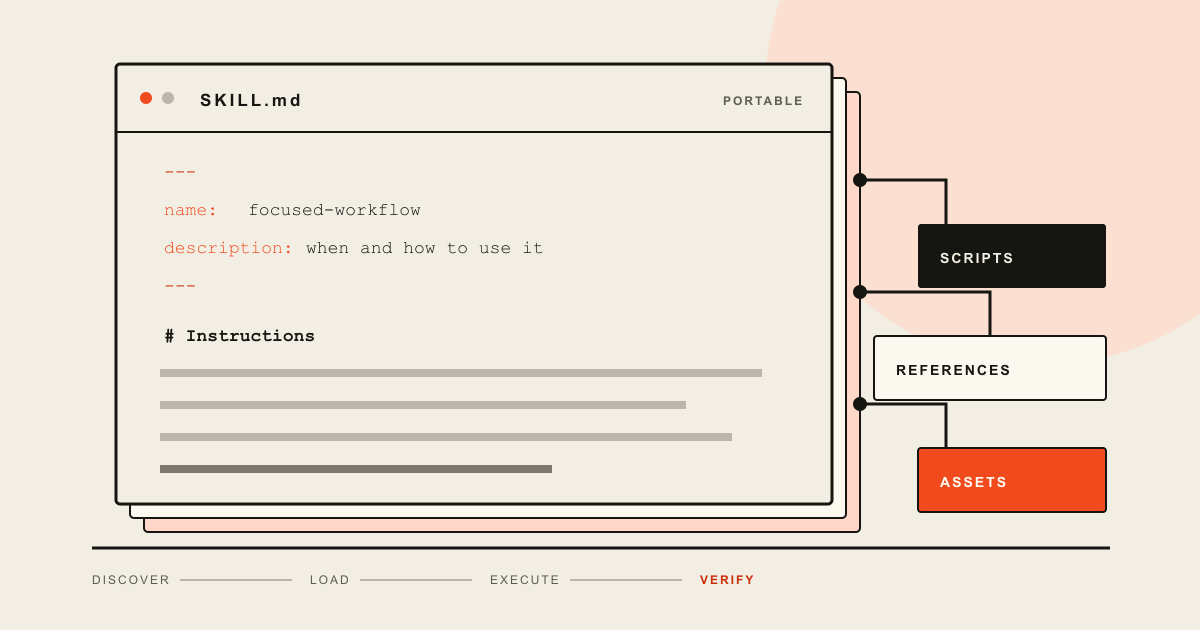
Agent Zero uses SKILL.md files as focused instruction packages. It can discover a skill from its description, load it only when a task matches, or keep it pinned in a chat. A portable skill needs a folder whose name matches the required lowercase name in SKILL.md, a specific description, and clear Markdown instructions. Scripts, references, and assets are optional and should load only when the task needs them.
An Agent Zero skill can be only one Markdown file. That small file still changes what the agent knows how to do, when it should use the procedure, and which supporting resources it can reach. Those are the Agent Zero AI SKILL.md features worth understanding before you install or write one.
Agent Zero can surface a skill when a task matches its description. It can then load the detailed instructions on demand. A user can also pin a skill so its procedure remains active in the current chat. This gives a skill two jobs: it must be discoverable from a short description, and it must be precise enough to guide the work after activation.
A vague skill may never load. A sprawling skill may load too much text and bury its own important rules. A well-designed skill keeps the routing metadata short, puts the working procedure in SKILL.md, and moves bulky material into files that the agent reads only when needed.
What a SKILL.md skill is
A skill is a directory with a required SKILL.md file. The file begins with YAML frontmatter and continues with Markdown instructions. The open Agent Skills specification requires two frontmatter fields: name and description.
The name is a machine-readable identifier. It must use lowercase letters, numbers, and hyphens, stay within 64 characters, and match the parent directory. The description explains both what the skill does and when an agent should use it. That second part is not decoration. It supplies the routing clues that help an agent select the right skill for a request.
Agent Zero's own documentation draws a practical boundary between three extension types:
| Extension | Best use | How it reaches the agent |
|---|---|---|
| Skill | A repeatable procedure or specialized method | Description and tag matching, then on-demand loading |
| Tool | An action the agent can execute | Function or code exposed to the agent |
| Knowledge | Facts and reference material | Retrieval when the information is relevant |
Use a skill for "how to do this work." Use a tool for "perform this action." Use knowledge for "retrieve facts about this subject." A skill may call a tool or point to knowledge, but it should not pretend that instructions alone create a capability the runtime does not have.
This fits the broader AI agent stack: a skill shapes the procedure inside the agent loop, while tools, permissions, memory, and runtime controls still determine what can happen outside the prompt.
The Agent Zero skill features that matter
Selective loading does most of the work. Agent Zero documents skills as focused instructions that it can load when a task needs them. The open standard calls the pattern progressive disclosure. A runtime can keep only the name and description available for discovery, load the full SKILL.md after activation, and read scripts or reference files later.
On-demand discovery
Users can ask for the outcome in ordinary language instead of naming every skill. Agent Zero searches for a suitable procedure from the available metadata. A description such as "Reviews Python database migrations for locking, rollback, and data-loss risk" gives the router much more useful evidence than "Helps with databases."
Manual activation and pinning
The Web UI also exposes a Skills selector from the plus button in the chat input. A user can add a skill manually, remove it, or pin it for a conversation. According to the current Agent Zero skills guide, active skills are added to the Protocol part of the prompt and remain visible to the agent on each turn.
Pinning is useful when a whole conversation must follow one procedure, such as a review rubric or a document format. It is a poor default for a skill that might become relevant once. Every pinned procedure competes for prompt space and attention, so the official guide recommends keeping the active list short.
Bundled resources
A skill can carry more than instructions. The standard defines conventional folders for executable scripts/, supporting references/, and static assets/. This makes a skill a small, versionable work package rather than a prompt fragment copied between chats.
The split also makes maintenance cleaner. A validator can live in scripts/, a long policy manual in references/, and a document template in assets/. The main file tells the agent when each resource is necessary. It does not paste all of them into the context at once.
Portability with limits
The Agent Skills format is open and is used by more than one agent product. Agent Zero's contributor guide lists compatibility with Agent Zero, Claude Code, Cursor, OpenAI Codex CLI, GitHub Copilot, and Goose. Portability is still a claim to test, not an automatic guarantee. Runtimes expose different tools, approval systems, paths, and interpretations of optional metadata.
For a portable core, follow the official specification: use a matching folder and name, write a specific description, keep the procedure in Markdown, and link to optional resources with relative paths. Add runtime-specific fields only when the target runtime needs them.
How to create a portable Agent Zero skill
Agent Zero documents both a helper CLI and a manual path. Its contributor guide uses python -m helpers.skills_cli create my-skill-name to scaffold a skill and python -m helpers.skills_cli validate my-skill-name to check it. For manual creation, it places custom skills under usr/skills/.
A small portable skill can use this layout:
release-note-review/
├── SKILL.md
├── references/
│   └── house-style.md
└── scripts/
    └── check_release.py
The corresponding SKILL.md can stay compact:
---
name: release-note-review
description: Review software release notes for missing upgrade steps, unclear compatibility claims, and unsupported security statements. Use before publishing a release or changelog.
license: MIT
metadata:
  version: "1.0"
---

# Release note review

1. Read the proposed release notes and identify the affected version.
2. Verify compatibility and security claims against linked issues or commits.
3. List missing upgrade, rollback, and configuration steps.
4. Apply the wording rules in `references/house-style.md`.
5. Run `scripts/check_release.py` on the final file.
6. Report every unresolved warning. Do not describe the review as passed while warnings remain.
This example uses the fields defined by the open specification. The instructions name the input, evidence, sequence, supporting files, validation step, and stopping condition. They do not depend on a hidden shared understanding between the author and the agent.
Watch the frontmatter dialect
Agent Zero's contributor documentation shows extra fields such as version, author, tags, triggers, and allowed_tools. The open Agent Skills specification defines license, compatibility, metadata, and an experimental allowed-tools field in addition to the two required fields.
The underscore in Agent Zero's documented allowed_tools and the hyphen in the open spec's allowed-tools are a real compatibility detail. Do not assume that one spelling grants or restricts tools identically across clients. If a field controls permissions, verify it against the installed Agent Zero version and the destination runtime. Put author or version data under metadata when you want to remain close to the portable standard.
That recommendation is an inference from the two current documents, not a promise that every client handles metadata in the same way. Validation can confirm the file format. Only a runtime test can confirm behavior.
How to load, pin, and remove skills
Agent Zero normally handles discovery from the request. Give it a concrete task that matches the description and inspect whether the skill appears in the run. If automatic recall is unreliable, improve the description before adding a long trigger list. The official contributor guide treats the description as central to semantic matching.
For manual control in the Web UI:
- Open the relevant chat.
- Select the plus button in the chat input.
- Open Skills and search for the skill.
- Add it to the current conversation.
- Remove it when the special procedure no longer applies.
Pin a skill when several turns must follow the same contract. A long editorial review, a migration checklist, or a repeated data-cleaning recipe fits that pattern. An occasional image conversion does not need to occupy every turn.
Skills, Agent Profiles, and Projects solve different problems in Agent Zero. A skill adds a procedure. A profile changes the broader behavior of the chat. A project supplies a workspace with its files, memory, secrets, and instructions. If a skill contains customer-specific secrets or large project context, the boundary is probably wrong. Keep secrets in the project's secret system and let the skill describe how authorized tools should request them.
Design a skill for reliable recall and execution
A skill needs a narrow job and an observable result. "Improve code" is not a useful boundary. "Review a database migration and report locking, rollback, and data-loss risks" is narrow enough to route, test, and maintain.
Write the description for the request a user will actually make. Include the artifact, the operation, and the situations that should activate the procedure. Synonyms help when they correspond to real wording, but a pile of loosely related keywords makes accidental activation more likely.
The body should answer six questions:
- What input must the agent locate or request?
- Which sources or files are authoritative?
- What actions should happen, and in what order?
- What must the agent never assume or change?
- How does it verify the result?
- What should it report when work cannot continue?
Keep stable rules in the main file. Move detailed tables, product documentation, and templates into focused references. The specification recommends keeping the complete SKILL.md under 500 lines and below roughly 5,000 tokens of instructions. Those are design recommendations rather than hard runtime limits, but they point at the right failure mode: once a skill becomes a handbook, the agent may struggle to locate the instruction that matters for the current step.
References should stay shallow. The standard recommends relative links from the skill root and warns against deep chains. A main instruction that links to a reference that links to another reference forces the agent to navigate a miniature website before it can work.
Scripts need contracts too. Document their inputs, dependencies, exit behavior, and expected output. A script that silently changes files or prints an ambiguous success message weakens the skill even if the prose is excellent.
Review third-party skills as code and policy
A downloaded skill can influence the agent's decisions and may bundle executable scripts. Treat it as both code and policy. Reading only the description is not enough.
Before activating a third-party skill:
- Read the complete
SKILL.mdand every file it tells the agent to execute. - Check scripts for network calls, destructive filesystem operations, credential access, and installation commands.
- Confirm that referenced paths stay inside the intended project or skill directory.
- Review dependencies and pin them when reproducibility matters.
- Compare requested tools with the narrowest actions the procedure needs.
- Test with disposable data before using production credentials or repositories.
The open specification labels allowed-tools experimental and notes that support varies by implementation. This means frontmatter alone is not a dependable sandbox boundary. The runtime's permission controls, container isolation, project scoping, and human approvals remain the controls that matter.
Also inspect the instructions for policy conflicts. A skill that says to ignore repository guidance, conceal errors, publish without validation, or request broad credentials is unsafe even when its scripts are harmless. The package can change behavior through prose before it runs any code.
Agent Zero runs in Docker and offers project isolation, but isolation is not permission to stop reviewing inputs. Mounted host folders, connector access, browser sessions, API tokens, and installed tools can extend the reachable surface. Grant each skill only the environment needed for its job.
Test and maintain the skill
Start with structural validation. Agent Zero documents its helper command:
python -m helpers.skills_cli validate release-note-review
The open standard also provides a reference validator through skills-ref. A clean validation result proves that the package follows the checked format. It does not prove that the routing description works or that the instructions produce a correct result.
Test three behaviors separately.
Recall tests
Write requests that should activate the skill, near-miss requests that should not, and ambiguous requests where the agent should ask for context. Test the language your users employ, not only the exact nouns in the description.
Execution tests
Use representative inputs with known findings. Include a normal case, missing files, malformed data, a failing script, and a task that would require an unavailable permission. Check the work trace as well as the final answer. A polished report can hide a skipped validation step.
Maintenance tests
Run the same cases after changing the skill, Agent Zero version, model, tools, or project configuration. Version the skill with its surrounding repository when possible. Record which behavior changed and why. Keep old compatibility claims out of the description once they are no longer tested.
In practice, a useful Agent Zero skill is smaller than its first draft. Its description routes one recognizable job, its instructions define evidence and verification, and its resources stay available without flooding the prompt. Its tests should not depend on the agent grading its own confidence.
Trace Brief checks technical claims against primary material and records its method in the editorial policy. Browse all AI agent field guides for related architecture and implementation coverage.
Sources and methodology
This article draws on the primary documentation and research listed below. An editor reviewed the technical claims and wording before publication.
- Agent Zero skills guide — current Web UI workflow for discovery, activation, pinning, and removal
- Contributing Skills to Agent Zero — Agent Zero skill locations, CLI commands, frontmatter examples, validation, and testing guidance
- Agent Skills specification — portable SKILL.md requirements, optional directories, progressive disclosure, and validation rules
- Agent Zero repository — current project capabilities, installation options, projects, and skill loading behavior